Search Intent Classifier
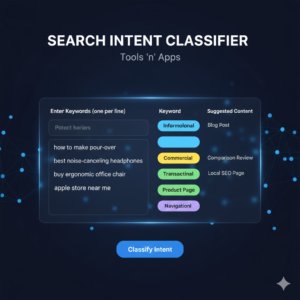
The Search Intent Classifier is an intelligence utility that analyzes keyword lists to determine the “Why” behind a search. By using linguistic pattern recognition, it categorizes keywords into four primary categories: Informational (learning), Navigational (finding a site), Commercial (investigating), and Transactional (buying).
Understanding intent is critical for avoiding keyword cannibalization and ensuring that the content you build actually satisfies what the user (and Google) expects to see.
👥 Who It Is For
SEO Strategists: To quickly map out content silos and site architectures based on user journeys.
Content Planners: To decide whether a keyword needs a long-form blog post, a product page, or a comparison table.
PPC Managers: To filter out informational keywords from high-intent transactional ad campaigns.
Affiliate Marketers: To identify “Commercial Investigation” keywords that are most likely to convert into sales.
🛠️ How To Use It
Paste Your Keywords: Enter your list of keywords (one per line) into the input area.
Classify: Click the “Classify Intent” button. The tool will scan for “modifier” words that signal intent.
Review the Badges: * Blue (Info): Users looking for answers or guides.
Purple (Nav): Users looking for a specific brand or login.
Yellow (Comm): Users comparing products or looking for “the best.”
Green (Trans): Users ready to purchase or sign up.
Content Strategy: Use the “Suggested Content” column to align your page type with the detected intent.
❓ FAQ (Frequently Asked Questions)
Q: Why is Search Intent important for SEO? A: If you try to rank a product page for an informational keyword (like “how to make coffee”), Google will likely ignore you in favor of a blog post. Matching intent is the #1 rule of modern search rankings.
Q: How accurate is the classification? A: The tool uses common linguistic triggers (e.g., “how,” “review,” “buy”) to classify intent. While highly accurate for most lists, we recommend a final manual check for highly industry-specific jargon.
Q: What is “Commercial Investigation”? A: This is the “Goldilocks” zone. Users aren’t just looking for info, but they aren’t ready to buy yet. They are looking for reviews, “best of” lists, and comparisons.
Q: Can I process thousands of keywords at once? A: Yes! Since the tool runs entirely in your browser using JavaScript, it can process large lists instantly without any server lag or data privacy concerns.
Now that you’ve identified your informational keywords, use the AI Answer-Box Optimizer to craft the perfect response for Google’s featured snippets.
Help AI search engines understand your intent mapping. Generate JSON-LD Schema to provide clear structural context for your Articles and FAQs.