JWT Debugger – Securely Decode JSON Web Tokens Online
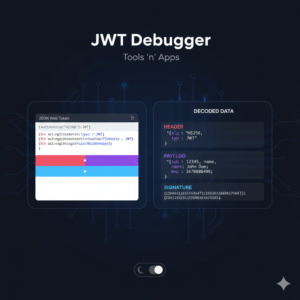
The JWT Debugger is a specialized utility that allows developers to decode and inspect JSON Web Tokens (JWT). A JWT is a compact, URL-safe means of representing claims to be transferred between two parties. This tool takes the encoded “gibberish” string and breaks it down into its three original components: the Header (algorithm info), the Payload (user data and permissions), and the Signature.
Because this tool is built with client-side JavaScript, the sensitive authentication tokens are never transmitted to a server, making it a safer alternative to many popular online decoders.
Who It Is For
Full-Stack & Backend Developers: To verify if a token being issued contains the correct claims, roles, or scopes.
Frontend Engineers: To check if a token has expired or to extract user information (like a username or profile ID) for the UI.
Security Researchers: To inspect the encryption algorithms and headers used in an authentication flow.
QA Testers: To manually validate that a session token is valid and hasn’t been corrupted.
How To Use
Paste your Token: Copy the JWT string from your application’s local storage, cookies, or console and paste it into the “Encoded Token” field.
Instant Decoding: The tool will automatically split the token by the
.(dot) separator.Inspect the Header: View the top box (Red) to see the signing algorithm (e.g., HS256 or RS256).
Analyze the Payload: View the middle box (Purple) to see user-specific data like
sub,name, oriat(issued at).Check Status: Look for the “Token Expired” badge; if the
expclaim in the payload is in the past, the tool will alert you immediately.Toggle Theme: Use the switch in the header to view the data in a style that suits your environment.
Frequently Asked Questions (FAQs)
Q: Is it safe to paste my production tokens here? A: Yes. Unlike many other JWT tools, our debugger processes the token entirely in your browser using JavaScript. No data is sent to our servers, and no logs are kept.
Q: Can this tool “crack” or “verify” a token’s signature? A: This tool is for debugging and inspection. To verify a signature, you need a private secret key. Since we prioritize privacy and do not have a backend, we do not ask for your secret keys. This tool helps you see if the signature looks correct.
Q: Why do I see a “Token Expired” warning? A: JWTs usually have an exp (expiration) timestamp. Our tool compares that timestamp with your current local computer time. If your computer clock is wrong, or the token has passed its life cycle, the warning will appear.
Q: Does it support all JWT types? A: Yes. It supports any token following the header.payload.signature format, including those using HS, RS, and ES algorithms.